
Credit Card Processing for Pool Service Companies: What to Know


You need to take credit cards. That's not a question anymore. Customers expect it. The ones who still write checks are shrinking every year. But credit card processing can feel confusing. There are fees, processors, terminals, and fine print. Here's what you actually need to know.
Key Takeaways
- Processing fees run 2.5-3% per charge. On a $160 monthly service, that's about $4.50.
- The fee pays for itself. You get paid faster, lose fewer customers to late payments, and spend zero time chasing checks.
- You don't need a terminal or card reader. Pool service is billed online. Cards are stored on file and charged automatically.
- Stripe is the standard for pool service software. PoolDial uses Stripe for secure, automatic billing.
- ACH (bank transfer) costs less. If fees bother you, offer ACH as an option alongside cards.
How Processing Fees Work
Every time you charge a credit card, you pay a fee. The fee has two parts. PoolDial uses Stripe, which keeps the pricing simple and transparent.
- Interchange fee. This goes to the customer's bank. It's about 1.5-2% and you can't negotiate it. Every business pays it.
- Processor fee. This goes to your payment processor (Stripe, Square, etc.). It's about 0.5-1% plus a flat fee per charge (usually $0.30).
Add them together and you get about 2.9% + $0.30 per charge. On a $160 monthly pool service bill, that's $4.94. On a full year, it's about $59 per customer.
| Monthly Bill | Card Fee (2.9% + $0.30) | You Keep | Annual Fee Cost |
|---|---|---|---|
| $120 | $3.78 | $116.22 | $45.36 |
| $160 | $4.94 | $155.06 | $59.28 |
| $200 | $6.10 | $193.90 | $73.20 |
Why the Fee Is Worth It
Some pool pros see $59/year per customer and cringe. But look at what you get for that money. PoolDial's billing processes cards automatically, so the fee is the only cost. There's no extra work on your end.
Here's what the fee replaces:
- Time chasing payments. At 80 pools, you spend 5-10 hours a month on manual billing. Your time is worth $50-75/hour. That's $250-750/month in labor. The card fees on 80 pools are about $395/month. You save money and time.
- Bad debt. 1-3% of invoices never get paid when you bill by check. On $12,000/month revenue, that's $120-360 gone forever. Card on file means the money always comes in.
- Late payment stress. No more awkward phone calls. No more "check's in the mail." PoolDial charges the card on the 1st. Done.
Credit Card vs ACH vs Check
You have three main ways to collect payment. PoolDial supports credit card and ACH. Here's how they compare.
| Method | Fee | Speed | Best For |
|---|---|---|---|
| Credit/Debit Card | 2.9% + $0.30 | 2 business days | Most customers. Fast, automatic, reliable. |
| ACH (Bank Transfer) | 0.8% (capped at $5) | 3-5 business days | Customers who want lower fees or don't have cards. |
| Check | $0 processing | 7-14 days (mail + deposit) | Nobody. Stop accepting checks. |
ACH is the best-kept secret in pool service billing. The fee is much lower than cards. On a $160 charge, ACH costs about $1.28 instead of $4.94. That's $44/year in savings per customer. PoolDial lets you set each customer's payment method to card or ACH, so you can offer both.
Should You Pass the Fee to Customers?
Some pool companies add a "convenience fee" or "processing fee" to card payments. This is legal in most states, but it has trade-offs. PoolDial's billing can add surcharges if you choose to go this route.
Absorb the Fee
Build it into your price. A $160 rate already includes the $5 processing cost. The customer never sees a fee line item.
Pass It On
Add a 3% surcharge to card payments. Offer a discount for ACH or check to encourage cheaper methods.
Most pool companies absorb the fee. It's simpler, cleaner, and avoids the awkward "why am I paying extra?" conversation. If you're worried about the cost, raise your base rate by $5. Nobody notices a $5 increase. Everybody notices a 3% surcharge. Use our service price calculator to make sure your rate covers all costs including processing.
What About Square, Venmo, or PayPal?
These work for one-time payments, but they're not built for recurring monthly billing. Here's why PoolDial uses Stripe instead.
- Square. Great for in-person payments. Not great for storing cards on file and charging them automatically every month. You'd have to manually charge each customer.
- Venmo / Cash App. No way to automate. No invoicing. No receipts. Looks unprofessional. You'll spend your evenings sending "request $160" to 80 people.
- PayPal. Higher fees (3.49% + $0.49). Customers need a PayPal account. Disputes are a headache.
- Stripe (via PoolDial). Built for recurring billing. Cards stored securely. Auto-charges on your schedule. Automatic retry on failed payments. Professional receipts. PoolDial handles the Stripe setup so you never touch code or dashboards.
Getting Started with Card Processing
If you're still on checks and want to switch to cards, here's the path. PoolDial makes this easy because Stripe setup is built into the onboarding.
- Sign up for PoolDial. Stripe account creation is part of the setup. You'll enter your bank info so deposits go to the right place.
- Send card-collection links. PoolDial generates a secure link for each customer. They tap it, enter their card, and it's stored safely. You never see or handle card numbers.
- Set billing dates. Pick the 1st, 15th, or whatever works. PoolDial charges every customer on that day each month.
- Get paid automatically. Money hits your bank account in 2 business days. No checks to deposit. No trips to the bank.
The whole switch takes about a week. Send the card links on Monday. Most customers add their card within 3 days. By the next billing cycle, you're on autopay. Read our full guide on setting up autopay for the details.
Security: Keeping Card Data Safe
You should never store credit card numbers yourself. Not on paper. Not in a spreadsheet. Not in your phone. That's a liability nightmare. PoolDial stores cards through Stripe's PCI-compliant vault. The card number is encrypted and tokenized. You never see it, touch it, or store it.
When a customer asks "is my card safe?" you can tell them: "Your card is stored by Stripe, the same company that handles payments for Amazon, Shopify, and millions of other businesses. We never see your full card number." PoolDial's customer portal lets them update their own card anytime without calling you.
See It in Action: PoolDial Billing
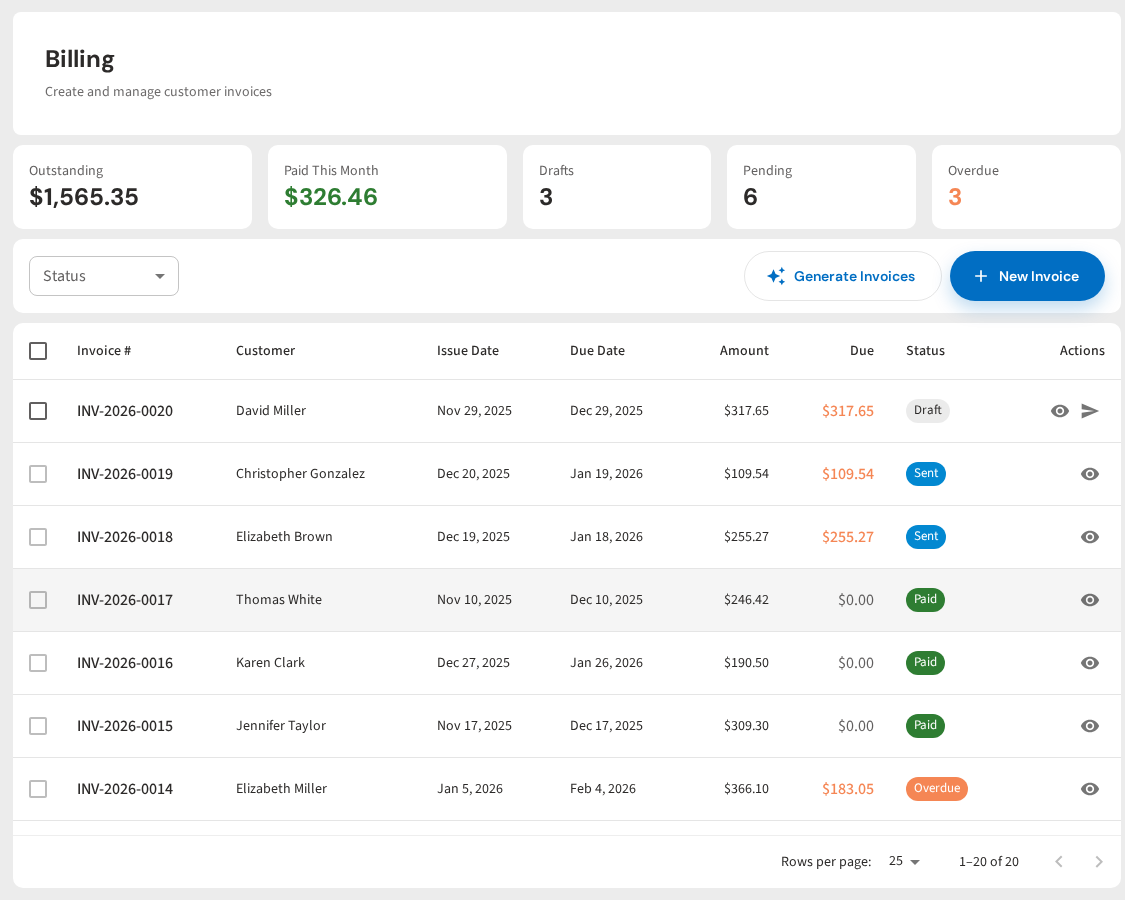
PoolDial handles credit card processing through Stripe with no extra setup. Cards are stored securely. Bills go out automatically. Failed payments retry on their own. You see every payment on one screen. No separate processor account to manage.
Start Taking Cards Today
PoolDial includes Stripe payment processing. Store cards securely, charge automatically, and get paid in 2 days. Plans start at $2/pool.
Start Your Free Trial