Pool Service Invoicing: What to Include and When to Send


A good invoice does two things. It tells the customer what they owe. And it gets you paid fast. A bad invoice does neither. It's confusing, it's late, and the customer ignores it because they don't know what they're looking at.
Most pool pros spend way too much time on invoicing. The fix isn't working harder at it. It's setting up a system that does most of the work for you.
Key Takeaways
- Keep invoices simple. Your customer doesn't need a novel. They need a number and a way to pay.
- Send on the same day every month. Customers pay faster when they expect the bill.
- Include a pay link. If they can't pay in two taps, you'll wait longer.
- Separate recurring service from one-time charges. Don't mix your monthly fee with a filter clean on the same line.
- Automate everything you can. You should not be typing invoices by hand for 80 pools.
What Belongs on a Pool Service Invoice
Your invoice should be clear enough that someone can read it in 10 seconds and know exactly what they owe and how to pay. Here's what to include:
- Your company name and logo. This is basic, but it matters. A branded invoice looks professional. A plain text email with a number at the bottom looks like spam.
- Customer name and address. Match it to the service address, not their mailing address. They want to see the pool you're servicing.
- Invoice date and number. Every invoice needs a unique number. This makes it easy to find later if there's a question.
- Service period. "April 2026 Pool Service" is clear. "Pool cleaning" is not. Tell them what month the charge covers.
- Line items. Break out recurring service and any extras. Monthly maintenance on one line. Filter clean on another. Chemical surcharge on another. Don't lump everything into one number.
- Total due. Big, bold, easy to find. Don't make them do math.
- Pay link or button. A clickable link to pay online. This is the most important thing on the invoice. If the customer has to write a check, find an envelope, and drive to a mailbox, you'll wait two weeks.
PoolDial's invoices include all of this automatically, plus a one-tap pay button for the customer.
When to Send Invoices
Timing matters more than most pool pros realize. The sooner you send the invoice, the sooner you get paid. But consistency matters even more than speed.
Pick a day and stick with it. The 1st of the month is the most common. Some companies use the 15th. Either works. What doesn't work is sending some invoices on the 3rd, others on the 8th, and a few whenever you remember.
| Timing | How It Works | Best For |
|---|---|---|
| Bill in advance (1st) | Charge on the 1st for that month's service | Autopay customers. Best cash flow. |
| Bill after service | Send invoice at end of month for work done | Customers who want to see work before paying |
| Staggered billing | Split customers into groups billed on the 1st and 15th | Larger companies that want steadier cash flow |
If you're on autopay, timing becomes automatic. The card charges on the 1st, the customer gets a receipt, and nobody thinks about it. That's the goal. PoolDial sends invoices on the date you pick and charges cards the same day.
Recurring vs One-Time Charges
Your monthly pool service should be the same charge every month. The customer knows the number. They expect it. No surprises.
One-time charges are different. A filter clean, a green-to-clean, an equipment repair. These need their own line item with a clear description. Don't just add $75 to the monthly bill and hope the customer doesn't notice. They will, and they'll call you.
The best approach:
- Monthly service: One line item. Same amount every month. "Monthly Pool Service - April 2026: $160.00"
- One-time work: Separate line item or separate invoice. "DE Filter Clean - April 12, 2026: $85.00"
- Chemical surcharges: If you charge extra for chemicals during summer, make it a clear line item. "Summer Chemical Surcharge: $25.00"
For help figuring out your monthly rate, use our service price calculator. For chemical cost tracking, check our cost per pool calculator. PoolDial's billing lets you add one-time charges with a note so the customer knows exactly what they are paying for.
How to Send Invoices
Paper invoices are dead. Don't print them. Don't mail them. Don't leave them in the pool equipment pad with a rock on top. Here's what works in 2026:
Text Message
A text with a pay link gets opened in seconds. Most customers pay within hours. This is the fastest way to get paid.
A branded email with invoice details and a pay button. Good for customers who want a record they can search later.
Customer Portal
Customers log in to see all their invoices, payment history, and service records. Best for customers who like to self-serve.
PoolDial sends invoices by text or email and gives every customer a portal where they can view and pay. No paper. No stamps. No chasing.
Build an On-Site Approval-to-Payment Workflow
The field problem is often bigger than “make an invoice on a phone.” A repair visit may need a quote, written scope, customer approval, deposit, work record, final invoice, payment, and receipt. If those steps live in separate notes, texts, and accounting screens, the technician can finish the repair before the business has a clean authorization trail.
In a recent on-site invoicing discussion, one operator described a tightly controlled sequence:
That is one company's experience, not a universal payment policy. Card-on-file requirements, deposits, cancellation rights, surcharges, refunds, signatures, and authorization language can be affected by the service, customer type, payment processor, card-network rules, and local law. Use written terms and get professional advice for your market.
The transferable lesson is the order of operations:
- Describe the problem. Attach photos, diagnostic findings, and any limitations.
- Quote before starting. List labor, parts, tax, exclusions, deposit, and change-order rules.
- Capture approval. Record who approved, when, how, and the accepted version.
- Collect only as authorized. Use the agreed deposit or payment method and send a receipt.
- Document completion. Record installed parts, final condition, warranty terms, and follow-up work.
- Convert to the final invoice. Reconcile approved changes before charging the remaining balance.
Speed matters, but test it with your real job types before switching systems. Create a customer, add an unplanned line item, attach a photo, calculate tax, request approval, take a deposit, convert the quote, collect the balance, issue a refund, and export the transaction to accounting. A one-minute happy path can still fail if change orders or reconciliation require office cleanup later.
QuickBooks has changed since many older workflow complaints were posted. Its current mobile documentation describes adding products or services, sending estimates, and converting an estimate to an invoice. Its newer invoice guidance also describes online approvals and mobile autosave. If that workflow remains slow on your device, compare a pool-specific field system that syncs finalized transactions to accounting instead of duplicating customers and line items by hand.
What Professional Invoices Look Like
A professional invoice builds trust. A sloppy one makes customers wonder if your pool work is sloppy too. Here's what separates the two:
| Sloppy Invoice | Professional Invoice |
|---|---|
| "You owe $160 for pool. Venmo me." | Branded PDF with company logo, service period, line items, and a pay button |
| Sent whenever you remember | Sent automatically on the 1st, every month |
| No invoice number | Numbered invoice (INV-2026-0412) for easy reference |
| Handwritten total | Itemized lines with clear totals |
| Pay by check or cash only | Click to pay with card, ACH, or Apple Pay |
You don't need to design invoices yourself. Your billing software handles the layout. You just need to make sure the information is right. Check our pricing guide for what to charge. PoolDial generates branded invoices with your logo, line items, and a pay link built in.
Stop Doing Invoicing by Hand
If you're making invoices one at a time in Word or Google Docs, you're spending hours on something that should take minutes. At 80 pools, manual invoicing eats 3-5 hours a month. That's a full half-day you could spend on billable work.
With billing software, you set up each customer once. Monthly service, rate, billing day. Then the system sends invoices automatically every month. You only touch it when something changes, like a price increase or a new add-on service. PoolDial handles the whole cycle: create, send, collect, and track.
See It in Action: PoolDial Billing
PoolDial creates and sends invoices for you. Set the monthly rate, pick the billing date, and the system handles the rest. Invoices go out by text or email. Customers pay with a tap. You see who's paid and who hasn't on one screen.
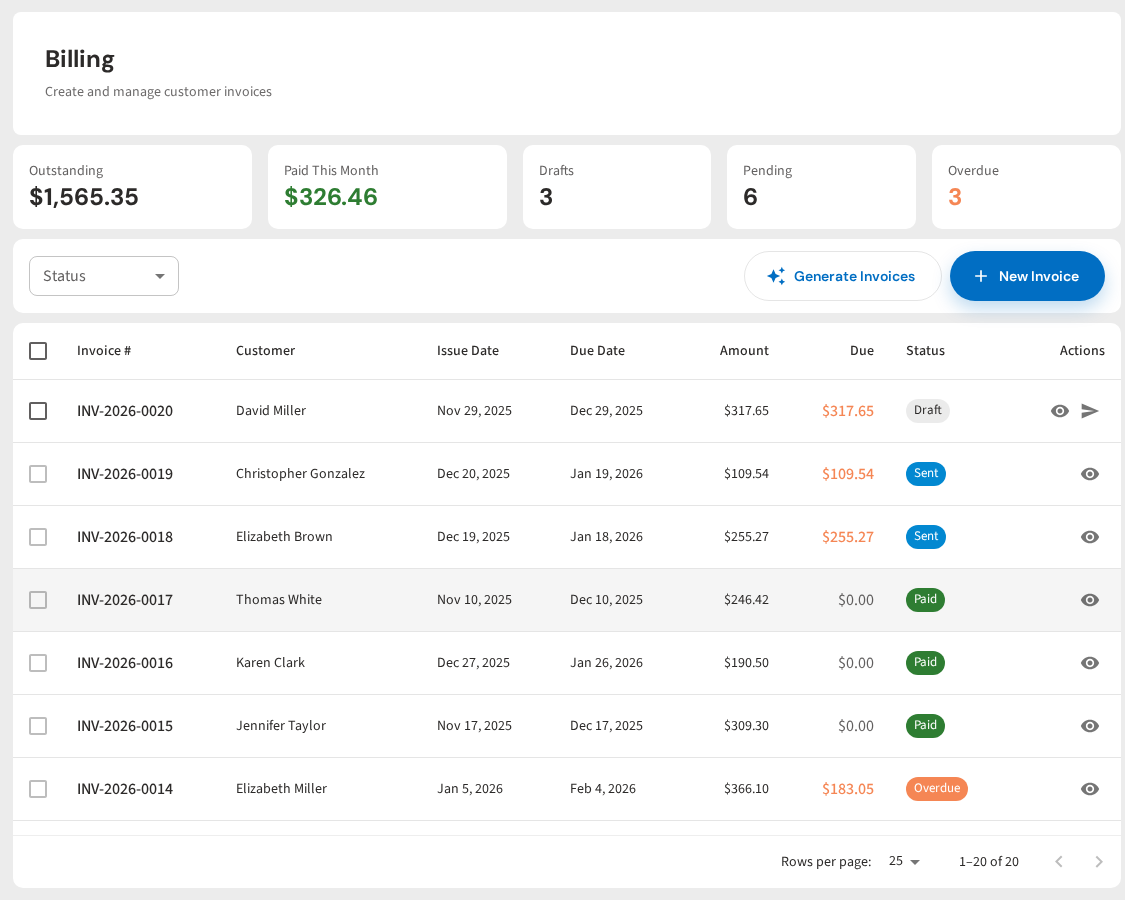
Invoicing That Runs Itself
PoolDial sends branded invoices, collects payments, and tracks who's paid. No more typing invoices by hand. Plans start at $2/pool.
Start Your Free Trial